Configuring stdio File Streams
Configuring stdin and stdout
Printing to the Serial Monitor or other serial terminal emulator on a host computer is common enough, especially for debugging.
For this reason, the cowpi_stdio_setup() function will configure the standard output file stream (stdout) to send its output to the USB connection to the host computer.
This will allow you to use printf() to print to a serial terminal.
Someone less-common is reading input from a serial terminal.
Nonetheless, the cowpi_stdio_setup() function will also configure the standard input file stream (stdin) to get its input from the USB connection to the host computer.
This will allow you to use scanf() to read from a serial terminal.
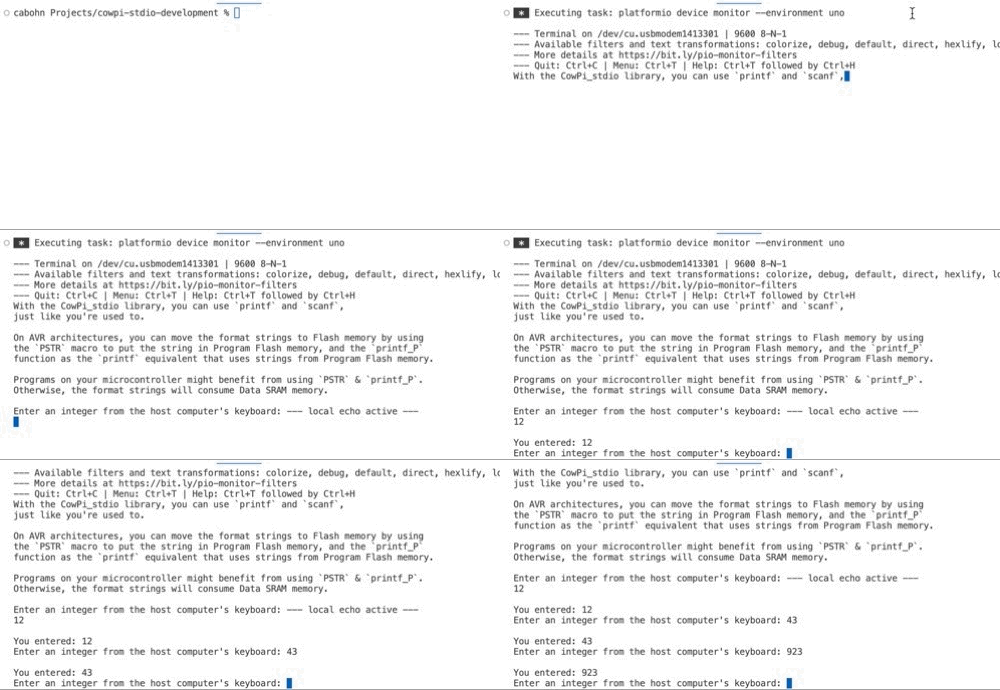
The only parameter is the bitrate, in bits per second; be sure to match the serial terminal’s expectations. 9600 is typical, though 115200 isn’t uncommon.
-
void cowpi_stdio_setup(unsigned long bitrate)
Configures the “Serial Monitor” for
printf()andscanf().Configures
stdoutandstdin, allowing programmers to useprintf()to write to, andscanf()to read from, the USB-based serial interface between the microcontroller and the host computer.- Parameters:
bitrate – the serial interface’s bit rate
Note
The cowpi_setup() function will call cowpi_stdio_setup().
If you call cowpi_setup() then there is no need to separately call cowpi_stdio_setup().
Important
If your program calls cowpi_stdio_setup() without a serial terminal to connect to, then one of two things
will happen, depending on which microcontroller board you are using:
Your program may continue to run without printing anything, and will reset when a serial terminal is connected (example: Arduino Nano)
Your program may block until a serial terminal is connected (example: Raspberry Pi Pico)
Note
The cowpi_stdio_setup() function does not configure the standard error file stream (stderr).
You may explicitly set the stderr file stream.
Common choices are to assign stderr = stdout or to assign stderr to a Morse Code “display” using cowpi_add_display_module().
Configuring a Display Module
To configure a display module and obtain a file stream that can be used with fprintf() to send text to that display module, use the cowpi_add_display_module() function.
-
FILE *cowpi_add_display_module(cowpi_display_module_t display_module, cowpi_display_module_protocol_t configuration)
Configures a display module for
fprintf().- Parameters:
display_module – the display module’s details
configuration – the communication protocol’s details
- Returns:
a pointer to a
FILEstream for the display module, orNULLif a stream could not be created
The function returns a FILE * pointer that can be used with fprintf().
If the function returns NULL then the file stream was not created.
The cowpi_add_display_module() function takes two arguments.
The first argument is a cowpi_display_module_t structure that has the details for the display module,
and the second argument is a cowpi_display_module_protocol_t structure that has details for the communication protocol that will be used to communicate with the display module.
Owing to differences between the C programming language and the C++ programming language, the CowPi_stdio library offers two mechanisms to create those arguments.
Configuring a Display Module in C
The C programming language allows structures to be initialized while skipping over fields whose values are irrelevant or whose default values are acceptable. Therefore, in C files we recommend calls of the form
 1FILE *display = cowpi_add_display_module(
 2            (cowpi_display_module_t) {
 3                    .display_module = XXX,          // XXX is the type of display module
 4                    ...other_relevant_fields...
 5            },
 6            (cowpi_display_module_protocol_t) {
 7                    .protocol = YYY,                // YYY is the communication protocol
 8                    ...other_relevant_fields...
 9            }
10        );
The structures are:
-
struct cowpi_display_module_t
Structure that consolidates all information needed about a display module.
Public Members
-
enum display_modules display_module
-
uint8_t width
-
uint8_t height
-
uint8_t words_per_minute
-
enum orientations display_orientation
-
enum display_modules display_module
-
struct cowpi_display_module_protocol_t
Structure that consolidates all information needed to determine how data should be sent to a display module.
Note
When initializing the structures, you should only specify the fields that are relevant for your display module and communication protocol.
For example, you would not specify the i2c_address for the SPI protocol, nor would you specify the display_orientation for a SEVEN_SEGMENT display module.
As a specific example, you might configure a 16x2 LCD character display that uses the I2C protocol with:
 1FILE *display = cowpi_add_display_module(
 2            (cowpi_display_module_t) {
 3                    .display_module = LCD_CHARACTER,
 4                    .width = 16,
 5                    .height = 2
 6            },
 7            (cowpi_display_module_protocol_t) {
 8                    .protocol = I2C
 9                    .i2c_address = cowpi_discover_i2c_address(SDA, SCL)
10            }
11        );
12fprintf(display, "Hello, World!\n");
Enumerated types are available where relevant.
Available Display Modules
-
enum display_modules
Choices of display modules.
Values:
-
enumerator NO_MODULE
-
enumerator SEVEN_SEGMENT
-
enumerator LED_MATRIX
-
enumerator LCD_CHARACTER
-
enumerator OLED_MATRIX
-
enumerator MORSE_CODE
-
enumerator NO_MODULE
See also
The MAX7219-driven Seven-Segment Display page has further discussion about MAX7219-driven seven-segment display modules.
The MAX7219-driven LED Dot Matrix Display page has further discussion about MAX7219-driven LED matrix display modules.
The HD44780-driven LCD Character Display page has further discussion about HD44780-driven LCD character display modules.
(SSD1306-driven OLED matrix displays are not yet available)
The Morse Code on Output Pin page has further discussion about using Morse Code to communicate with only an LED or active buzzer.
For MAX7219-driven LED matrix displays, there is no standard relationship between dot matrix positions and MAX7219 bits. For this reason, we provide a way to ensure that the top of the characters are at the top of the display and to ensure that the characters are forward-facing and not reversed.
-
enum orientations
Rotation/orientations for LED matrices.
There is no significance to the names of the orientations except that they are easy-to-remember names for the four possible orientations and make no implications about a preference for how the application programmer orients their LED matrix.
Values:
-
enumerator EAST
-
enumerator NORTH
-
enumerator WEST
-
enumerator SOUTH
-
enumerator EAST
-
enum flips
Mappings the matrix LEDs to each byte’s bits.
There doesn’t appear to be consensus on which end of the matrix corresponds to the most/least-significant bits. Consequently, assuming one mapping could result in the characters being displayed backwards, and so we offer the opportunity to select the mapping.
There is no significance to the names of the orientations except that they are easy-to-remember names for the two possible mappings and make no implications about a preference for one mapping or the other.
Values:
-
enumerator HEADS
-
enumerator TAILS
-
enumerator HEADS
Available Communication Protocols
-
enum protocols
Communication protocols used to send data to a display module.
Values:
-
enumerator NO_PROTOCOL
-
enumerator I2C
-
enumerator SPI
-
enumerator NO_PROTOCOL
Because HD44780-driven LCD character displays do not natively communicate over a serial protocol, an adapter is required. Depending on which adapter you use, you may need to specify how the adapter maps the protocol’s bits to the display module’s bits.
See also
The Communication Protocols for Display Modules page has further discussion about the communication protocols.
-
enum adapter_mappings
Mappings of transmitted bits to LCD character display lines.
Universally, the adapter modules for HD44780-based displays map transmitted bits to some of the display module’s lines: four data bits, the RS (data/command) line, the RW (read/write) line, and the backlight. Where they differ is which bits correspond to which lines.
The default mapping is that used by the ubiquitous PCF8574-based modules that sell for a couple of dollars. The ADAFRUIT mapping is that used by Adafruit’s I2C/SPI character LCD backpack.
Values:
-
enumerator COWPI_DEFAULT
-
enumerator ADAFRUIT
-
enumerator COWPI_DEFAULT
Configuring a Display Module in C++
The C++ programming language does not allow skipping over fields in struct initializers, and so we have provided convenience functions.
These convenience functions have default argument values where appropriate (which is not an option in C), and so in CPP and INO files we recommend calls of the form
1FILE *display = cowpi_add_display_module(
2            cowpi_configure_XXX(...arguments...),   // XXX is the type of display module
3            cowpi_configure_YYY(...arguments...)    // YYY is the communication protocol
4        );
As a specific example, you might configure a 16x2 LCD character display that uses the I2C protocol with:
1FILE *display = cowpi_add_display_module(
2            cowpi_configure_lcd_character_display(16, 2),
3            cowpi_configure_i2c(cowpi_discover_i2c_address(SDA, SCL));
4        );
5fprintf(display, "Hello, World!\n");
Convenience functions are available for each of the possible display modules and communication protocols.
Available Display Modules
-
static inline cowpi_display_module_t cowpi_configure_seven_segment_display()
Produces a
cowpi_display_module_tinstantiation for a MAX7219-controlled 8-digit/7-segment display module.- Returns:
a
cowpi_display_module_tinstantiation initialized for an 8-digit/7-segment display
See also
The MAX7219-driven Seven-Segment Display page has further discussion about MAX7219-driven seven-segment display modules.
-
static inline cowpi_display_module_t cowpi_configure_led_matrix_display(uint8_t words_per_minute = 30, enum orientations display_orientation = EAST, enum flips character_flip = HEADS)
Produces a
cowpi_display_module_tinstantiation for a MAX7219-controlled 8x8 LED matrix display module that has text scrolling from right-to-left.You may need to experiment with choices of
display_orientationandcharacter_flip— one of the eight possible combinations will match your particular display.- Parameters:
words_per_minute – the approximate rate at which the text scrolls across the display
display_orientation – parameter to match the characters’ rotation with that of your display
character_flip – parameter to match the characters’ bit order with that of your display
- Returns:
a
cowpi_display_module_tinstantiation initialized for an 8x8 LED matrix display with scrolling text
See also
The MAX7219-driven LED Dot Matrix Display page has further discussion about MAX7219-driven LED matrix display modules.
-
static inline cowpi_display_module_t cowpi_configure_lcd_character_display(uint8_t width = 16, uint8_t height = 2)
Produces a
cowpi_display_module_tinstantiation for an HD44780-controlled LCD character display.- Parameters:
width – the number of characters per row; 16 is the default, and 20 is an option
height – the number of rows; 2 is the default, and 4 is an option
- Returns:
a
cowpi_display_module_tinstantiation initialized for an LCD character display
See also
The HD44780-driven LCD Character Display page has further discussion about HD44780-driven LCD character display modules.
(cowpi_configure_oled_matrix_display() is not yet available)
-
static inline cowpi_display_module_t cowpi_configure_morse_code(uint8_t words_per_minute = 5)
Produces a
cowpi_display_module_tinstantiation for a “display” of that places Morse Code on an output pin.The nominal usage is to illuminate an LED; however, a buzzer with its own oscillator crystal will also work.
- Parameters:
words_per_minute – the approximate rate at which the text is sent to the output pin
- Returns:
a
cowpi_display_module_tinstantiation initialized for sending Morse Code to an output pin
See also
The Morse Code on Output Pin page has further discussion about using Morse Code to communicate with only an LED or active buzzer.
Available Communication Protocols
-
static inline cowpi_display_module_protocol_t cowpi_configure_single_pin(uint8_t data_pin)
Produces a
cowpi_display_module_protocol_tinstantiation for a “display” that doesn’t require a communication protocol, such asMORSE_CODE.- Parameters:
data_pin – the pin used to send data to the “display”
- Returns:
a
cowpi_display_module_protocol_tinstantiation initialized forNO_PROTOCOL
-
static inline cowpi_display_module_protocol_t cowpi_configure_spi(uint8_t select_pin, uint8_t data_pin = COWPI_DEFAULT_SPI_DATA_PIN, uint8_t clock_pin = COWPI_DEFAULT_SPI_CLOCK_PIN, enum adapter_mappings adapter_mapping = COWPI_DEFAULT)
Produces a
cowpi_display_module_protocol_tinstantiation for the Serial-Parallel Interface (SPI) protocol.- Parameters:
data_pin – the data output pin, possibly called SDO, COPI, PICO, DAT (data), TX, or (deprecated) MOSI
clock_pin – the clock pin, possibly called SCK or CLK
select_pin – the peripheral-select pin, possibly called CS, LAT (latch), or (deprecated) SS
adapter_mapping – (optional) the mapping of transmitted bits to HD44780 lines
- Returns:
a
cowpi_display_module_protocol_tinstantiation initialized forSPI
-
static inline cowpi_display_module_protocol_t cowpi_configure_i2c(uint8_t i2c_address, uint8_t data_pin = COWPI_DEFAULT_I2C_DATA_PIN, uint8_t clock_pin = COWPI_DEFAULT_I2C_CLOCK_PIN, enum adapter_mappings adapter_mapping = COWPI_DEFAULT)
Produces a
cowpi_display_module_protocol_tinstantiation for the Inter-Integrated Circuit (I2C, or IIC), aka the Two-Wire Interface (TWI), protocol.- Parameters:
data_pin – the data output pin, SDA
clock_pin – the clock pin, SCL
i2c_address – the peripheral’s 7-bit address
adapter_mapping – (optional) the mapping of transmitted bits to HD44780 lines
- Returns:
a
cowpi_display_module_protocol_tinstantiation initialized forI2C
See also
The Communication Protocols for Display Modules page has further discussion about the communication protocols.