HD44780-driven LCD Character Display
The HD44780 “dot-matrix liquid crystal display controller and driver LSI displays alphanumerics, Japanese kana characters, and symbols.” You can readily find HD44780-driven LCD character display modules online for a few dollars. While these display modules can be driven directly from a microcontroller, the CowPi_stdio library assumes that you are using a serial adapter to allow the microcontroller to communicate with the display module through SPI or I2C.
While the integrated circuits on both the display module and (most of) the serial adapters function at both 3.3V and 5V, most of the display modules’ liquid crystals are insufficiently responsive to 3.3V. Unless you know that you have a display module that will work at 3.3V, you should use a “level converter” (or a serial adapter that will perform the “level conversion”).
Discussion
Configuring the Display
While the HD44780 does support other options, this library supports only the very common 16x2 and the reasonably-common 20x4 LCD character displays. The logic should work with other configurations that the HD44780 supports, but until we have the opportunity to test other configurations, the library will reject them.
By default, the library assumes that a character display is 16 columns by 2 rows. This means that (in C++)
cowpi_configure_lcd_character_display()
is equivalent to
cowpi_configure_lcd_character_display(16, 2)
and (in C)
(cowpi_display_module_t) {.display_module = LCD_CHARACTER}
is equivalent to
(cowpi_display_module_t) {
        .display_module = LCD_CHARACTER,
        .width = 16,
        .height = 2
}
For 20 columns by 4 rows, use (in C++)
cowpi_configure_lcd_character_display(20, 4)
or (in C)
(cowpi_display_module_t) {
        .display_module = LCD_CHARACTER,
        .width = 20,
        .height = 4
}
Font
The HD44780 has one of two possible character ROMs.
(See Table 4 of the HD44780 datasheet.)
Both have most of the ASCII character set above 0x1F.
(ROM A00 has ¥ instead of \, → instead of ~, and ← instead of DEL. ROM A02 has ⌂ instead of DEL.)
Each of the two ROMs has additional characters outside the ASCII range.
The HD44780 also allows up to eight programmer-defined custom characters;
these are available for bytes 0x00-0x07, with 0x08-0x0F aliased to the same eight custom characters.
We recommend that you use bytes 0x01-0x08.
This is because \x0 would be interpreted as a terminal NUL, \x9 is a horizontal tab, \xA is a line feed, \xB is a vertical tab, \xC is a form feed, and \xD is a carriage return.
Use cowpi_hd44780_create_character() to create the custom characters.
The character vector consists of 8 bytes. pixel_vector[0] corresponds to the character’s top row, and pixel_vector[7] corresponds to the bottom row.
Within each byte, bits 7..5 are unused, bit 4 is the pixel in the leftmost column, and bit 0 is the pixel in the rightmost column.
ASCII Control Characters
Some of the ASCII control characters are ignored for the practical reason that the byte values correspond to printable characters in the HD44780’s character ROM.
|
|
|
|
|
|
|
0x1B (gcc |
0x7F |
|
|---|---|---|---|---|---|---|---|---|---|
ASCII |
bell (alarm) |
backspace |
horizontal tab |
line feed (newline) |
vertical tab |
form feed (newpage) |
carriage return |
escape |
delete |
LCD character display |
prints |
prints |
shifts cursor right |
clears remaining line,
then
\v\r |
places cursor in next row,
then
\r |
places cursor in top left |
places cursor in left column |
prints |
prints |
Serial Adapters
The library assumes the LCD character display module is connected to your microcontroller through a serial adapter.
Common I2C Adapter
The most-likely serial adapter you would use is the ubiquitous PCF8574-based serial adapter. (While that link points to a particular manufacture’s documentation, the design is produced by, and available from, many sources for a dollar or two.) Because of its ubiquity, its mapping of transmitted bits to the display module’s lines is the library’s default.
Shift Register (SPI)
If you would rather communicate with the display module using SPI, a 74xx595 is a good choice. You can find many examples of using a shift register for this purpose, though few of them agree with the bit mapping. We have chosen a bit mapping identical to that of the PCF8574-based I2C adapters.
While the 74HC595 shift register is typical, a different logic family can perform the “level conversion” from 3.3V to 5V. Assuming you provide 5V Vcc to the display module and to the shift register, then the 74AHCT595 accepts logic-high inputs as low as 2V, generating logic-high outputs at 5V.
Adafruit I2C/SPI Adapter
Adafruit offers a I2C/SPI serial adapter that uses I2C by default but can be changed to SPI with a simple solder jumper. Its bit mapping does not match that of the PCF8574-based I2C adapters (indeed, the Adafruit’s SPI bit mapping doesn’t match its own I2C bit mapping, but the library can handle that). The most recent version of the Adafruit serial adapter also performs the “level conversion” from 3.3V to 5V, even without being provided 5V power.
Communication Protocols
Because you have choices for a serial adapter, you can use I2C or SPI with a HD44780-based display module, whichever is appropriate for your serial adapter. Also because you have choices for a serial adapter, you may have to specify the bit mapping.
I2C
At a minimum, you need to specify the I2C address to indicate which peripheral should receive and acknowledge that data. If you have only one I2C peripheral on the bus, you can use cowpi_discover_i2c_address() to do so.
Note that while there are default data and clock pins for the cowpi_display_module_protocol_t structure (and for cowpi_configure_i2c()),
cowpi_discover_i2c_address()’s parameters do not currently have default values (this may change in the future).
In C++, use
cowpi_configure_i2c(cowpi_discover_i2c_address(SDA, SCL))
to generate the appropriate cowpi_display_module_protocol_t using the default pins, or
cowpi_configure_i2c(cowpi_discover_i2c_address(the_data_pin, the_clock_pin),
                    the_data_pin,
                    the_clock_pin)
to use non-default pins.
In C, use
(cowpi_display_module_protocol_t) {
        .protocol = COWPI_I2C,
        .i2c_address = cowpi_discover_i2c_address(SDA, SCL)
}
to use the default pins, or
(cowpi_display_module_protocol_t) {
        .protocol = COWPI_I2C,
        .data_pin = the_data_pin,
        .clock_pin = the_clock_pin,
        .i2c_address = cowpi_discover_i2c_address(the_data_pin, the_clock_pin)
}
to use non-default pins.
By default, the COWPI_DEFAULT bit mapping is used.
If you wish to use the ADAFRUIT bit mapping then specify so with
cowpi_configure_i2c(cowpi_discover_i2c_address(the_data_pin, the_clock_pin),
                    the_data_pin,
                    the_clock_pin,
                    ADAFRUIT)
in C++. Note that in C++, if you wish to specify a non-default bit mapping then you must specify the data pin and clock pin, even if you use the default pins.
In C, however, you can omit the data pin and clock pin if you use their defaults, and so you can use
(cowpi_display_module_protocol_t) {
        .protocol = COWPI_I2C,
        .i2c_address = cowpi_discover_i2c_address(SDA, SCL),
        .adapter_mapping = ADAFRUIT
}
or
(cowpi_display_module_protocol_t) {
        .protocol = COWPI_I2C,
        .data_pin = the_data_pin,
        .clock_pin = the_clock_pin,
        .i2c_address = cowpi_discover_i2c_address(the_data_pin, the_clock_pin),
        .adapter_mapping = ADAFRUIT
}
SPI
At a minimum, you need to specify the pin used to indicate which peripheral should latch the data in. In C++, use
cowpi_configure_spi(the_select_pin)
to generate the appropriate cowpi_display_module_protocol_t variable.
In C, use
(cowpi_display_module_protocol_t) {.protocol = COWPI_SPI, .select_pin = the_select_pin}
By default, the data pin and the clock pin are those used by the SPI hardware, even if you use the library’s bit-banged SPI implementation. If you wish to use other pins, then specify them with
cowpi_configure_spi(the_select_pin, the_data_pin, the_clock_pin)
in C++, or
(cowpi_display_module_protocol_t) {
        .protocol = COWPI_SPI,
        .data_pin = the_data_pin,
        .clock_pin = the_clock_pin,
        .select_pin = the_select_pin
}
in C.
By default, the COWPI_DEFAULT bit mapping is used.
If you wish to use the ADAFRUIT bit mapping then specify so with
cowpi_configure_spi(the_select_pin,
                    the_data_pin,
                    the_clock_pin,
                    ADAFRUIT)
in C++. Note that in C++, if you wish to specify a non-default bit mapping then you must specify the data pin and clock pin, even if you use the default pins.
In C, however, you can omit the data pin and clock pin if you use their defaults, and so you can use
(cowpi_display_module_protocol_t) {
        .protocol = COWPI_I2C,
        .i2c_address = cowpi_discover_i2c_address(SDA, SCL),
        .adapter_mapping = ADAFRUIT
}
or
(cowpi_display_module_protocol_t) {
        .protocol = COWPI_SPI,
        .data_pin = the_data_pin,
        .clock_pin = the_clock_pin,
        .select_pin = the_select_pin,
        .adapter_mapping = ADAFRUIT
}
Custom Transmission Function
As noted in HD44780-driven LCD Character Display, cowpi_hd44780_send_halfbyte is used to send data and commands to the display module.
The cowpi_hd44780_send_halfbyte function pointer initially points to either a function that transmits the halfbytes via SPI or to a function that transmits the halfbytes via I2C.
-
typedef void (*cowpi_hd44780_send_halfbyte_t)(const cowpi_display_module_protocol_t *configuration, uint8_t halfbyte, bool is_command)
Pointer to function that sends a halfbyte to the HD44780 character display.
The
cowpi_hd44780utility functions all make use of thecowpi_hd44780_send_halfbyte()function pointer.Initially,
cowpi_hd44780_send_halfbyte()is one of two default implementations, depending on whether the communication protocol is SPI or I2C.Re-implementing this function to use SPI or I2C hardware is a possible part of a memory-mapped I/O lab assignment.
SPI: Assumes the display module’s data-in line is connected to the microcontroller’s COPI pin (D11 on most Arduino boards), the display module’s serial-clock line is connected to the microcontroller’s SCK pin (D13 on most Arduino boards), and the display module’s chip-select line is connected to Arduino pin D10.
I2C: Assumes the display module’s data line is connected to the microcontroller’s SDA pin (D18 on most Arduino boards) and the display module’s serial-clock line is connected to the microcontroller’s SCL pin (D19 on most Arduino boards).
See also
- Param configuration:
the microcontroller pins, adapter mapping, and possibly i2c peripheral address
- Param halfbyte:
the data to be sent to the display module
- Param is_command:
indicates whether the data is part of a command (
true) or part of a character (false)
-
cowpi_hd44780_send_halfbyte_t cowpi_hd44780_send_halfbyte
Pointer to function that sends a halfbyte to the HD44780 character display.
The
cowpi_hd44780utility functions all make use of thecowpi_hd44780_send_halfbyte()function pointer.Initially,
cowpi_hd44780_send_halfbyte()is one of two default implementations, depending on whether the communication protocol is SPI or I2C.Re-implementing this function to use SPI or I2C hardware is a possible part of a memory-mapped I/O lab assignment.
SPI: Assumes the display module’s data-in line is connected to the microcontroller’s COPI pin (D11 on most Arduino boards), the display module’s serial-clock line is connected to the microcontroller’s SCK pin (D13 on most Arduino boards), and the display module’s chip-select line is connected to Arduino pin D10.
I2C: Assumes the display module’s data line is connected to the microcontroller’s SDA pin (D18 on most Arduino boards) and the display module’s serial-clock line is connected to the microcontroller’s SCL pin (D19 on most Arduino boards).
See also
- Param configuration:
the microcontroller pins, adapter mapping, and possibly i2c peripheral address
- Param halfbyte:
the data to be sent to the display module
- Param is_command:
indicates whether the data is part of a command (
true) or part of a character (false)
If you write a custom function to transmit data and commands to the display module, be sure that its signature matches a cowpi_hd44780_send_halfbyte_t and then assign that function to cowpi_hd44780_send_halfbyte:
void my_send_halfbyte(const cowpi_display_module_protocol_t *configuration, uint8_t halfbyte, bool is_command);

void setup(void) {
    /* other setup code */
    cowpi_hd44780_send_halfbyte = my_send_halfbyte;
}

/* other functions */

void my_send_halfbyte(const cowpi_display_module_protocol_t *configuration, uint8_t halfbyte, bool is_command) {
    ...
}
Examples
hd44780_blinky
Because you often need to adjust the LCDs’ bias with a trim potentiometer (often labeled “Contrast”) for optimum viewing, or indeed for viewing at all, the hd44780_blinky example primarily exists to demonstrate that you have a successfully connected to the display module by turning the backlight on and off.
The hd44780_blinky example also demonstrates the use of custom characters.
Here that is done through a conversion specifier since the particular character to be displayed is variable.
If the character were constant, then the literal byte for the character RAM address could be placed in the format string: "It's a ghost: \x1\n".
Finally, the hd44780_blinky example demonstrates a work-around for the lack of variable-width conversions on AVR microcontrollers.
FILE *display;

void setup(void) {
    cowpi_stdio_setup(9600);

    // **********
    // CHOOSE SERIAL-TO-PARALLEL MAPPING (typically can omit adapter mapping if using COWPI_DEFAULT)
    enum adapter_mappings adapter_mapping = COWPI_DEFAULT;
    // enum adapter_mappings adapter_mapping = ADAFRUIT;
    // **********

    // **********
    // CHOOSE SPI OR I2C
    // cowpi_display_module_protocol_t pins = cowpi_configure_spi(SS, MOSI, SCK, adapter_mapping);
    cowpi_display_module_protocol_t pins = cowpi_configure_i2c(cowpi_discover_i2c_address(SDA, SCL),
                                                               SDA,
                                                               SCL,
                                                               adapter_mapping);
    // **********

    display = cowpi_add_display_module((cowpi_display_module_t) {.display_module = LCD_CHARACTER}, pins);
    if (!display) {
        printf("received NULL file pointer\n");
        while (1) {}
    } else {
        printf("You should see the backlight blinking.\n");
        printf("Adjust the contrast until you can see the \"Hello, world!\" message.\n");
        fprintf(display, "Hello, world!\n");
    }

    uint8_t blinky[][8] = {
            {0x0E, 0x1F, 0x1D, 0x1F, 0x1F, 0x1F, 0x1F, 0x15},
            {0x0E, 0x1F, 0x1D, 0x1F, 0x1F, 0x1F, 0x1F, 0x0A},
            {0x0E, 0x1F, 0x17, 0x1F, 0x1F, 0x1F, 0x1F, 0x15},
            {0x0E, 0x1F, 0x17, 0x1F, 0x1F, 0x1F, 0x1F, 0x0A},
    };
    cowpi_hd44780_create_character(&pins, 1, blinky[0]);
    cowpi_hd44780_create_character(&pins, 2, blinky[1]);
    cowpi_hd44780_create_character(&pins, 3, blinky[2]);
    cowpi_hd44780_create_character(&pins, 4, blinky[3]);
}

void loop(void) {
    unsigned long time = millis();
    if (time & 0x400) {
        cowpi_sleep_display(display);
    } else {
        cowpi_wake_display(display);
    }
    static enum {
        WAITING_LEFT, MOVING_LEFT, WAITING_RIGHT, MOVING_RIGHT
    } mode = WAITING_RIGHT;
    static int8_t column = 0;
    static int8_t blinky_frame = 1;
    static bool alternate = false;
    if (alternate ^ !(time & 0x100)) {
        alternate = !alternate;
        blinky_frame += alternate ? 1 : -1;
        switch (mode) {
            case WAITING_LEFT:
                fprintf(display, "%13c\r", blinky_frame);
                if (column == 20) {
                    mode = MOVING_LEFT;
                    column = 9;
                } else {
                    column++;
                }
                break;
            case WAITING_RIGHT:
                fprintf(display, "%4c \r", blinky_frame);
                if (column == 20) {
                    mode = MOVING_RIGHT;
                    column = 0;
                } else {
                    column++;
                }
                break;
            case MOVING_LEFT:
#ifdef __AVR__
                // gotta do it this way since AVR doesn't do variable-width conversions
                for (int i = 0; i < column; i++) {
                    fprintf(display, " ");
                }
                fprintf(display, "%4c \r", blinky_frame);
#else
                fprintf(display, "%*c \r", column + 4, blinky_frame);
#endif //__AVR__
                if (column == 0) {
                    mode = WAITING_RIGHT;
                    column = 0;
                    blinky_frame = 1;
                    alternate = false;
                } else {
                    column--;
                }
                break;
            case MOVING_RIGHT:
#ifdef __AVR__
                for (int i = 0; i < column; i++) {
                    fprintf(display, " ");
                }
                fprintf(display, "%4c\r", blinky_frame);
#else
                fprintf(display, "%*c\r", column + 4, blinky_frame);
#endif //__AVR__
                if (column == 9) {
                    mode = WAITING_LEFT;
                    column = 0;
                    blinky_frame = 3;
                    alternate = false;
                } else {
                    column++;
                }
                break;
            default:
                printf("Surprising mode: %d\n", mode);
        }
    }
}
hd44780_lcd_character
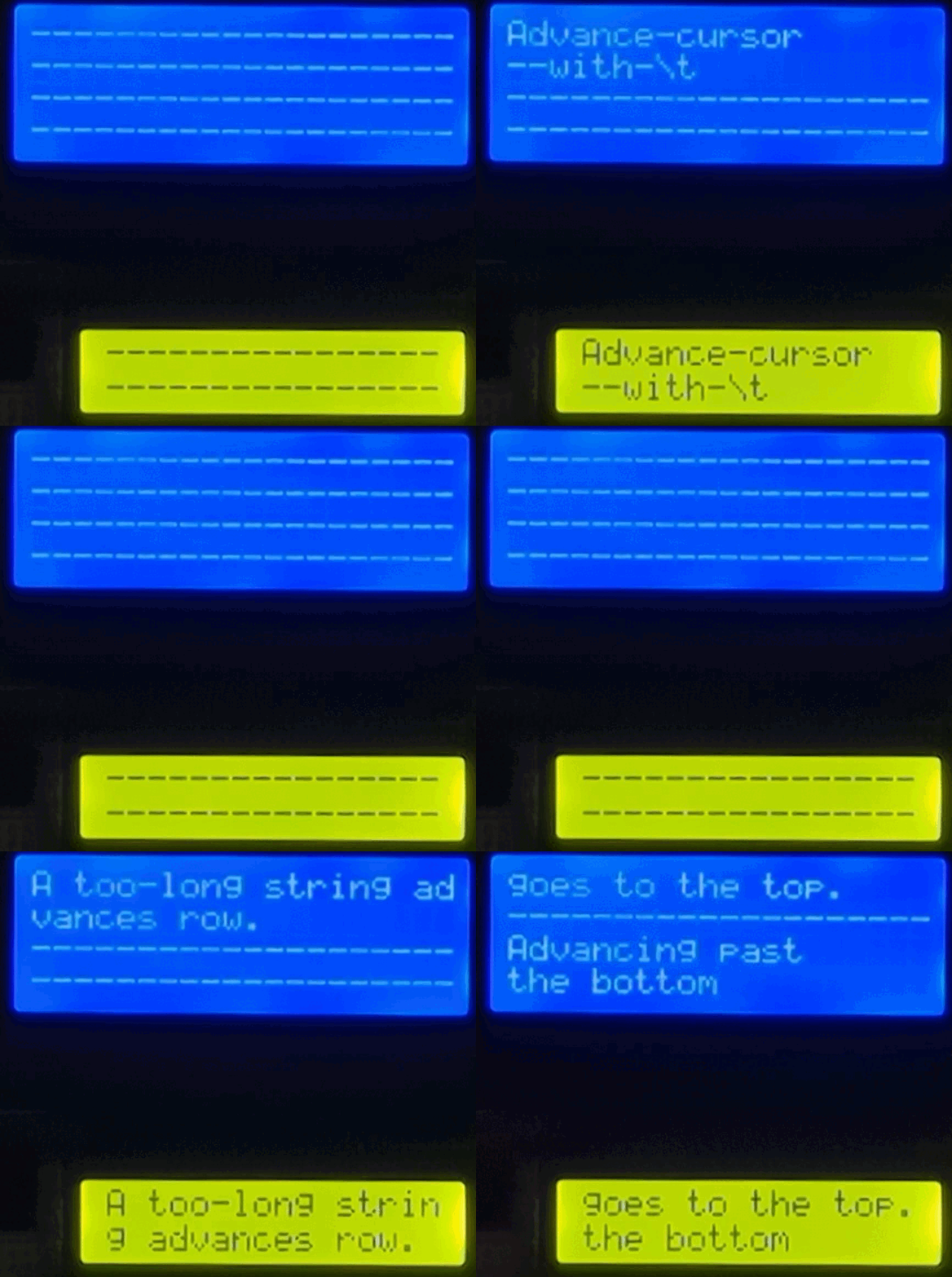
The hd44780_lcd_character example demonstrates the behavior of each of the ASCII control characters supported by this library for the LCD character display module.
It also demonstrates a work-around for the missing ASCII printable characters (\ and ~) by using the library’s dot matrix font and the HD44780’s custom character RAM.
FILE *display;
const uint8_t backslash = 0x01;

void fill_display(void);

void setup(void) {
    cowpi_stdio_setup(9600);

    // **********
    // CHOOSE SERIAL-TO-PARALLEL MAPPING (typically can omit adapter mapping if using COWPI_DEFAULT)
    enum adapter_mappings adapter_mapping = COWPI_DEFAULT;
    // enum adapter_mappings adapter_mapping = ADAFRUIT;
    // **********

    // **********
    // CHOOSE SPI OR I2C
    // cowpi_display_module_protocol_t pins = cowpi_configure_spi(SS, MOSI, SCK, adapter_mapping);
    cowpi_display_module_protocol_t pins = cowpi_configure_i2c(cowpi_discover_i2c_address(SDA, SCL),
                                                               SDA,
                                                               SCL,
                                                               adapter_mapping);
    // **********

    display = cowpi_add_display_module(
            (cowpi_display_module_t) {
                    .display_module = LCD_CHARACTER,
                //    .width = 20,
                //    .height = 4
            },
            pins
    );
    if (!display) {
        printf("received NULL file pointer\n");
        while (1) {}
    }

    // ROM Code A00 has a Yen symbol instead of '\\'
    uint8_t backslash_matrix[8];
    cowpi_font_ascii_to_5wide_dotmatrix(backslash_matrix, '\\');
    cowpi_hd44780_create_character(&pins, backslash, backslash_matrix);

    cowpi_hd44780_clear_display(&pins);
    // On AVR architectures, you can use `fprintf_P` with `PSTR` to put the
    // format string in flash memory, if you want to
    // !!! Notice how much RAM the text in this example uses !!!
#ifdef __AVR__
    fprintf_P(display, PSTR("Hello, World!\n"));
#else
    fprintf(display, "Hello, World!\n");
#endif //__AVR__
    delay(1000);
}

void loop(void) {
    fill_display();
    fprintf(display, "Most characters\n");
    fprintf(display, "overwrite others\n");
    fill_display();
    printf("Horizontal tab (\\t, 0x09) advances 1 space without overwriting the character.\n");
    fprintf(display, "Advance\tcursor\n");
    // place a custom character with the literal byte for its CGRAM address
    fprintf(display, "\t\twith\t\x1t\n");
    fill_display();
    printf("Form feed, or new page, (\\f, 0x0C) places the cursor in the top row and performs a carriage return.\n");
    fprintf(display, "return home\n");
    // or place a custom character with the "%c" conversion specifier
    fprintf(display, "  with %cf\f", (char) backslash);
    delay(1500);
    fprintf(display, "like this\n");
    fill_display();
    printf("Vertical tab (\\v, 0xB) advances to the next row without clearing any characters, and performs a carriage return\n");
    fprintf(display, "Go to next row\v");
    fprintf(display, "  with %cv\v", (char) backslash);
    fill_display();
    printf("Line feed, or new line, (\\n, 0xA) clears the remaining characters, advances to the next row, and performs a carriage return\n");
    fprintf(display, "Clear row & go\n");
    fprintf(display, "to next row: %cn\n", (char) backslash);
    fill_display();
    printf("Carriage return (\\r, 0x0D) places the cursor at the left position of the current row.\n");
    fprintf(display, "Go to row start\n");
    fprintf(display, "  with %cr  \r", (char) backslash);
    delay(1500);
    fprintf(display, "like this\n");
    fill_display();
    fprintf(display, "A too-long string advances row.\n");
    fill_display();
    fprintf(display, "\f\v\vAdvancing past\nthe bottom\n");
    delay(1500);
    fprintf(display, "goes to the top.\n");
}

void fill_display(void) {
    delay(2000);
    fprintf(display, "\f----------------\n");
    fprintf(display, "----------------\n");
    fprintf(display, "----------------\n");
    fprintf(display, "----------------\f");
    delay(1000);
}